PulaoEcho
8 麦克风全向高清收音,50+ 语种实时转写,多端协同。为会议、访谈与课堂而生的 AI 记录终端。
8-mic omnidirectional HD capture, real-time transcription in 50+ languages, and multi-device sync — an AI recorder built for meetings, interviews and lectures.
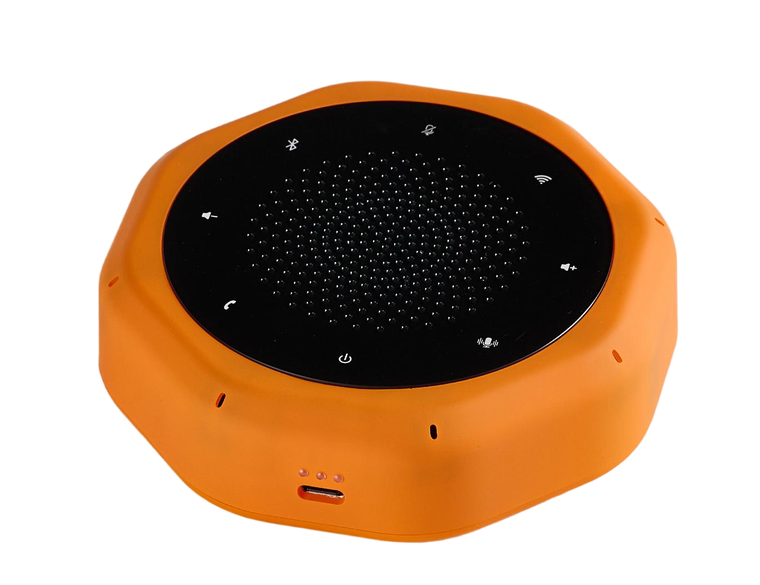
产品亮点Product highlights
六项核心能力,构成 PulaoEcho 的完整工作链路。
Six core capabilities that make up the complete PulaoEcho workflow.
高清收音与降噪
- 8 麦全向阵列收音,360° 无死角拾音
- AI 智能降噪,复杂环境下人声依旧清晰
- 长按录音键可切换 AI 降噪 / 定向拾音 / 普通录音三种模式
- 稳定输出,适用于会议室、教室、户外等复杂声学环境
- 8-mic omnidirectional array, 360° pickup with no dead zones
- AI noise reduction keeps voices clear in noisy environments
- Long-press the record button to switch between AI noise reduction, directional pickup, and normal recording
- Stable performance across meeting rooms, classrooms and outdoors
50+ 语种实时转写
- 支持 50 种以上语言,中英文混说也能准确识别
- 理想条件下识别准确率可达 98%
- 支持仅本地离线转写,无网络也能出稿
- 实时同步转写需 Wi-Fi 已连接且具备会员权益,详见第 03 节
- Supports over 50 languages, including mixed Chinese-English speech
- Up to 98% accuracy under ideal conditions
- Local offline transcription available — no network required
- Real-time sync transcription requires an active Wi-Fi connection and a membership — see section 03
多端同步
- 手机 APP:随时查看录音、转写与文件
- 电脑直连:通过 Type-C 传输文件、管理录音
- 云端同步:数据备份,多设备可访问
- Mobile app — browse recordings, transcripts and files anytime
- Direct computer connection via Type-C for file transfer and management
- Cloud sync — backup your data and access it from multiple devices
便捷操作功能
- 一键录音 / 一键转写
- 一键静音,隐私随时掌控
- 一键通话,短按即可接听或挂断
- One-tap recording and transcription
- One-tap mute — you control privacy at any moment
- One-tap call handling — short press to answer or end a call
AI 助理
- 按你的提问作答,答案基于你此前的录音记录数据
- 会议纪要、访谈大纲、购买计划,一键调用即可生成
- Answers your questions based on your earlier recording data
- Meeting notes, interview outlines, purchase plans — generated in one tap
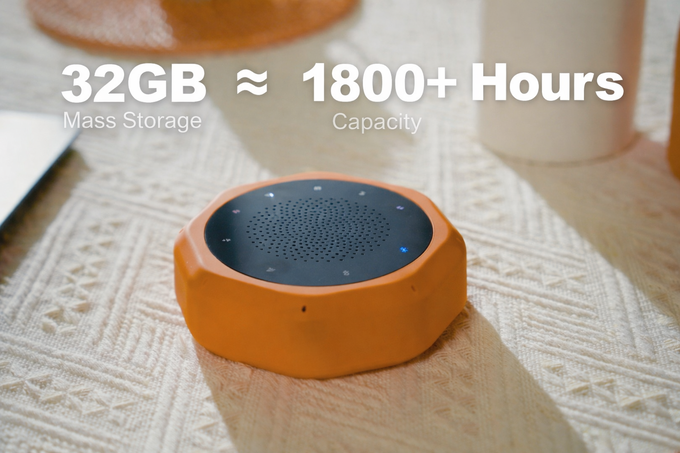
32GB 本地存储
- 32GB 本地存储空间,约可容纳 1800+ 小时录音
- 录音自动保存到设备,不必频繁导出清理
- 支持 Type-C 直连电脑管理与导出文件
- 32GB of local storage — room for 1800+ hours of recordings
- Recordings are saved to the device automatically, so there is no need to export and clean up often
- Manage and export files by connecting directly to a computer via Type-C
三种连接模式
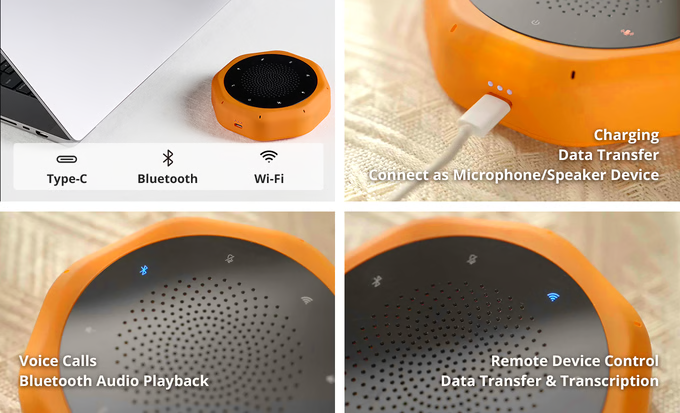
适用场景
Applications






按键说明Button functions
设备共 9 个实体按键与接口。短按与长按触发不同功能,请对照下表操作。
The device has 9 physical buttons and ports. Short press and long press trigger different functions — refer to the table below.
| 按键 / 接口Button / Port | 操作方式Action | 功能说明Function |
|---|---|---|
| 电源键Power | 长按 3 秒Long press 3s | 开机 / 关机。开机成功时三颗指示灯从左到右依次亮起;若此时插着 USB,三颗灯闪烁表示正在充电。Power on / off. On successful startup the three indicators light up from left to right; if USB is connected at that time, all three blink while charging. |
| 录音转写键Record / Transcribe | 短按Short press | 启动 / 停止录音。录音时指示灯常亮,再次短按结束录音。Start / stop recording. The indicator stays lit while recording; press again to stop recording. |
| 录音转写键Record / Transcribe | 长按Long press | 在录音模式下的三种模式间切换:AI 降噪(嘈杂环境,自动抑制环境音)、定向拾音(聚焦指定方向的人声)、普通录音(不额外处理原始录音)。Cycles through three recording modes: AI noise reduction (suppresses ambient noise in loud environments), directional pickup (focuses on speech from a given direction), and normal recording (unprocessed original audio). |
| 音量 ± 键Volume ± | 短按Short press | 调节音量,每短按一次递增或递减 1 档。Adjust volume — each press increases or decreases it by one level. |
| 静音键Mute | 短按Short press | 开启 / 取消麦克风静音。静音后麦克风停止收音,避免无关声音被录入。Enable / disable microphone mute. While muted the microphone stops capturing, so unrelated sound is not recorded. |
| 通话键Call | 短按Short press | 接听与挂断通话。需先通过蓝牙连接手机。Answer and end calls. Requires an active Bluetooth connection to your phone. |
| 蓝牙键Bluetooth | 长按Long press | 进入蓝牙配对模式。在手机蓝牙列表中搜索「PulaoEcho」即可完成配对。Enter Bluetooth pairing mode. Search for "PulaoEcho" in your phone's Bluetooth list to pair. |
| Wi-Fi 键Wi-Fi | 长按Long press | 进入 MTP 模式,可从电脑直接拷贝设备存储中的录音文件。Enter MTP mode so you can copy recording files directly from the device via a computer. |
| Type-C 接口Type-C port | 插拔Plug in | 充电与数据传输二合一。连接电脑可直接管理录音文件。Charging and data transfer in one port. Connect to a computer to manage recording files directly. |
| LED 指示灯LED indicators | 自动Automatic | 三颗 LED 指示灯的含义取决于是否插入 USB: 插上 USB 时 — 三颗灯闪烁表示正在充电,长亮表示充电完成。 未插 USB 时 — 显示当前电量:亮 1 颗约 25%,亮 2 颗约 50%,亮 3 颗表示 75% 以上。What the three LEDs mean depends on whether USB is connected: With USB connected — all three blink while charging, and stay solid when charging is complete. Without USB — they show battery level: 1 light ≈ 25%, 2 lights ≈ 50%, 3 lights = above 75%. |
请以 1 秒为界:短按 = 快速轻触后松开;长按 = 按住 1 秒以上再松开。电源键为长按 3 秒。
Use 1 second as the threshold: a short press is a quick tap and release; a long press is holding for more than 1 second before releasing. The power button requires a 3-second hold.
三步开机即用Three steps to start
开机后即可直接录音。录音与转写同步进行,需 Wi-Fi 已连接且具备会员权益。
Start recording as soon as it powers on. Recording and transcription run together — automatic transcription requires an active Wi-Fi connection and a membership.
开机Power on
长按电源键 3 秒,直至三颗指示灯全部亮起。若设备插着 USB,三颗灯会闪烁,表示正在充电。
Hold the power button for 3 seconds until all three indicators light up. If USB is connected, all three will blink to show that charging is in progress.
连接(可选)Connect (optional)
如需使用同步转写、云端存储、多设备同步或手机端查看,请按下面任一方式连接设备。不连接仍可正常录音,只是无法同步转写。
To use automatic transcription, cloud storage, multi-device sync, or phone-based access, connect via either method below. Recording still works without connecting — automatic transcription just won't be available.
蓝牙仅用于连接手机与通话,不能完成 Wi-Fi 配网。Wi-Fi 配网请见下一节。
Bluetooth is only for phone connection and call handling — it cannot configure Wi-Fi. See the next section for Wi-Fi setup.
录音与转写Record & transcribe
短按录音键开始录音,设备同步自动转写。录音时指示灯常亮,再次短按录音键即结束录音。
Short-press the record button to start recording — transcription runs automatically at the same time. The indicator stays lit while recording; press again to stop.
同步转写需同时满足 ① Wi-Fi 网络已连接(见第 04 节配网)② 具备会员权益。任一条件不满足时仍可正常录音,但转写需另行操作。
Automatic transcription requires both ① an active Wi-Fi connection (see section 04 for setup) and ② an active membership. Recording still works normally without them, but transcription must then be triggered separately.
- 1录音过程中指示灯常亮,再次短按即结束录音The indicator stays lit throughout recording; press the button again to stop
- 2录音与转写同步进行,无需另行操作(需 Wi-Fi 已连接且具备会员权益)Recording and transcription run together — no separate step needed(requires an active Wi-Fi connection and a membership)
- 3录音中可随时短按静音键保护隐私Press the mute button at any time during recording to protect privacy
长按可切换三种录音模式
Long-press to switch between three recording modes
设备绑定与 Wi-Fi 配网Device binding & Wi-Fi setup
要使用同步转写、多设备同步和手机端查看,需要先把设备绑定到「蒲牢铭声」APP 并完成一次 Wi-Fi 配网。同步转写还需具备会员权益。
To use automatic transcription, multi-device sync, or phone-based access, bind your device to the PulaoEcho app and complete a one-time Wi-Fi setup. Automatic transcription also requires a membership.
操作流程
Process
① 设备支持 2.4 GHz 与 5 GHz 两种 Wi-Fi 频段,可任选其一;② Wi-Fi 密码即你的路由器密码,请保持与 Wi-Fi 密码一致;③ 配网过程中请勿断电或移开设备;④ 蓝牙连接与 Wi-Fi 配网是两个独立步骤,蓝牙本身不具备配网功能。
① The device supports both 2.4 GHz and 5 GHz Wi-Fi bands — use either one; ② Use the same password as your Wi-Fi network; ③ Do not power off or move the device during setup; ④ Bluetooth connection and Wi-Fi setup are two independent steps — Bluetooth alone cannot configure Wi-Fi.
APP 管理App management
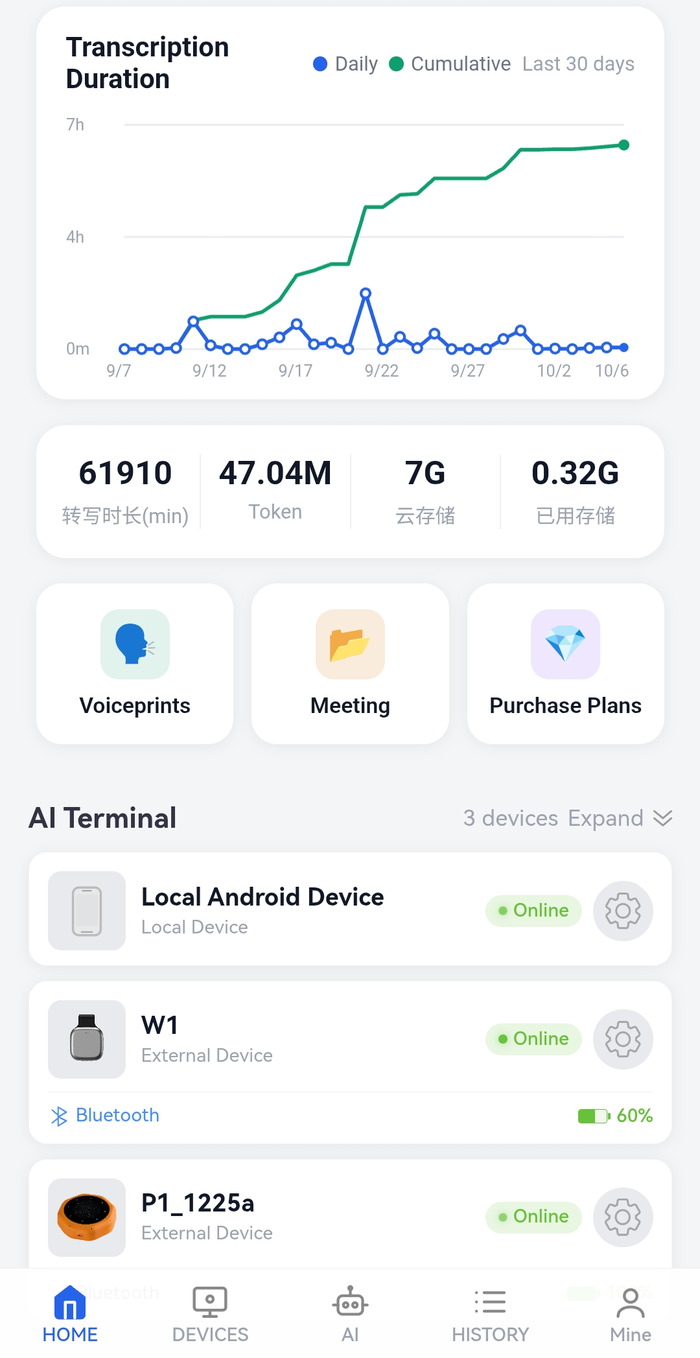
「蒲牢铭声」APP 首页汇总了转写时长、存储用量与全部设备状态。
The PulaoEcho app home screen summarises transcription time, storage usage and the status of all your devices.
开启离线转写
Enable offline transcription
下载并启用本地离线模型后,转写不再依赖网络,飞机上、地下室等无信号环境同样可用。
Once the local offline model is downloaded and enabled, transcription no longer depends on a network connection — usable on flights and in areas without signal.
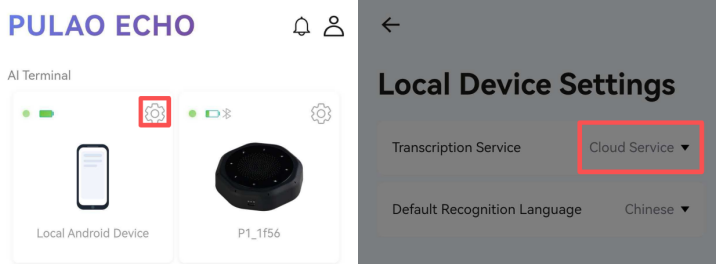
APP → 设置 → 转录服务 → 本地离线
App → Settings → Transcription Service → Local Offline
常见故障排查Troubleshooting
遇到以下问题,先按对应处理方式排查,多数情况可自行解决。
For the issues below, try the corresponding fix first — most can be resolved on your own.
| 问题现象Symptom | 处理方式Fix |
|---|---|
| 无法开机Won't power on | 充电 15 分钟后重试。长时间未使用可能导致电池进入保护状态。插入 USB 后三颗灯闪烁即说明已正常通电;三颗灯长亮表示已充满。若插入后完全不闪烁,先更换数据线与充电头排查。Charge for 15 minutes and try again. Long periods of inactivity may put the battery into a protection state. Once USB is plugged in, all three LEDs blinking means power is reaching the device normally; all three staying solid means charging is complete. If they never blink, try a different cable and charger first. |
| 电脑不识别设备Computer not recognized | 更换数据线或 USB 接口,确认使用的是支持数据传输的线缆而非仅充电线。Change the cable or USB port, and confirm you're using a data-capable cable rather than a charge-only one. |
| 录音无声No recording sound | 检查麦克风是否被遮挡,以及静音键是否已开启。Check that the microphone is unobstructed and that the mute button is not engaged. |
| Wi-Fi 配网失败Wi-Fi setup failed | 确认 Wi-Fi 密码与路由器密码一致,靠近路由器重试。设备支持 2.4 GHz 与 5 GHz 两种频段,如路由器同时开启双频请确认所选的是当前信号较强的频段。Confirm the Wi-Fi password matches your router password, and retry closer to the router. The device supports both 2.4 GHz and 5 GHz — if your router broadcasts both, pick the stronger band. |
| 蓝牙搜不到设备Device not found via Bluetooth | 确认已长按蓝牙键进入配对模式(指示灯闪烁),并检查手机蓝牙是否已开启。Make sure you've long-pressed the Bluetooth button to enter pairing mode (indicator flashing), and check that Bluetooth is enabled on your phone. |
| 转写结果不准确Inaccurate transcription | 在 APP 中切换至与实际说话语种一致的识别语言;环境嘈杂时建议贴近麦克风使用。Switch the recognition language in the app to match the language actually spoken; in noisy environments speak closer to the microphone. |
指示灯速查
LED quick reference
- 亮 1 颗1 light约 25%≈ 25%
- 亮 2 颗2 lights约 50%≈ 50%
- 亮 3 颗3 lights75% 以上above 75%
- 闪烁Blinking正在充电Charging
- 长亮Solid已充满Fully charged
注意事项Precautions
录音合规Recording consent
- 录音前请获得所有参与者的明示同意
- 涉及他人隐私或商业机密时,务必事先告知并取得许可
- 公共场所录音请遵守当地法律法规
- Obtain explicit consent from all participants before recording
- Notify and get permission before recording anything involving others' privacy or confidential business information
- Comply with local laws when recording in public spaces
使用与保养Handling
- 避免进水、摔落、高温与尖锐物品撞击
- 勿私自拆机,否则将失去保修资格
- 浅充浅放,避免长期满电或完全耗尽,以延长电池寿命
- Avoid water, drops, high temperatures and impact from sharp objects
- Do not disassemble the device — this will void your warranty
- Avoid keeping the battery full or empty for long periods to extend its lifespan
售后与保修Warranty & support
主机保修Main unit
内置电池保修Battery
官方邮箱Email
@pulaoai.com
保修范围
Coverage
保修仅覆盖产品出厂时本身的制造缺陷。以下情况不在保修范围内:
The warranty covers manufacturing defects present at the time of shipment. The following are not covered:
长期不使用设备时,请将电池电量保持在 40%–60% 区间存放,并建议每 3 个月 补充一次电量。完全亏电存放造成的电芯永久损坏不属于保修范围。
When storing the device for long periods, keep the battery between 40%–60% charge and top it up roughly every 3 months. Irreversible cell damage from storing at zero charge is not covered by warranty.
- 因保管不当、进水、摔落等外力造成的损坏
- 私自拆机、维修导致的人为损坏
- 长期闲置亏电至电量耗尽,导致电芯不可逆的永久损坏
- 超出保修期限的部件与耗材
- Damage from improper handling, water ingress, drops or other external forces
- Damage caused by unauthorised disassembly or repair
- Irreversible permanent cell damage caused by long-term storage at zero charge
- Parts and consumables beyond the warranty period
联系与资源
Contact & resources
| 官方邮箱Email | pulaoecho_support@pulaoai.com |
| 官方网站Website | www.pulaoai.com |
| 视频教程Video tutorials | www.pulaoai.com/videos.html |
8 麦克风 AI 语音记录终端8-microphone AI voice recorder
V1.0